The best displays to pair with your new Mac mini or Mac Studio

Consumers who have just bought a new Mac mini or Mac Studio often need a high‑quality external monitor to match the device’s performance. The following roundup covers a range of options, from Apple’s own displays to third‑party panels, and spans several price points and form factors.
Apple’s flagship Studio Display remains the most obvious choice for users who want a seamless macOS experience. The 27‑inch 5K panel offers a 5120 × 2880 resolution, a 60‑Hz refresh rate, and a polished aluminum enclosure. It is available with a standard glass front and a tilt‑adjustable stand, or with a nano‑texture glass that reduces glare and a stand that also adjusts in height. The Studio Display is positioned as a premium product; its price reflects that status, but it provides the tightest integration with macOS, including support for the built‑in microphone array and camera.
A more advanced version, the Studio Display XDR, was introduced earlier this year. It replaces the LED backlight with a mini‑LED array, raising the peak brightness to 1000 cd / m² and adding a 120‑Hz refresh rate. The panel remains 27 inches, but the price climbs considerably above the standard model. The XDR also offers a nano‑texture glass option and a stand that adjusts in height.
For users who prefer a different design language, the Samsung M9 Smart Monitor delivers a 32‑inch 4K OLED panel. The OLED technology yields deep blacks and vibrant colors, while the 32‑inch screen size is large enough for multitasking. The monitor includes a full array of ports, including Thunderbolt 4, and is priced in the mid‑tier range.
LG’s UltraFine 6K is a 32‑inch display that pushes resolution to 6144 × 3456 pixels. It features a wide color gamut, HDR support, and a rich set of connectivity options, including USB‑C and HDMI. The panel is aimed at professionals who need the highest level of color accuracy and image detail.
Asus offers two competitive 5K and 6K options. The ProArt PA27JCV is a 27‑inch 5K display that matches the Studio Display’s resolution but is priced at roughly half the cost. The ProArt PA32QCV ups the size to 32 inches and delivers a native 6016 × 3384 resolution, also 5K‑class, while keeping a price below many 4K competitors. Both monitors include Thunderbolt 4 connectivity and are marketed toward creators who require accurate color representation.
Samsung’s ViewFinity S8 is a 27‑inch 5K monitor that offers a similar resolution to the Studio Display but with a different build. It includes a USB‑C port and a standard HDMI input, making it a flexible choice for Mac users who want a 5K panel without the premium price of Apple’s offering.
BenQ’s PD2730S is another 27‑inch 5K panel that focuses on professional design work. It offers Thunderbolt 4 connectivity, a built‑in color calibration tool, and a wide color gamut. The monitor is positioned as a direct competitor to the Studio Display, especially for users who need a 5K resolution but prefer a third‑party brand.
For those who want a large screen without paying for 5K resolution, the BenQ PD3225U provides a 32‑inch 4K panel under $1,000. It features Thunderbolt 4, a high refresh rate, and a range of ports, making it an attractive option for users who need a big display for multitasking but can accept 4K resolution.
Ultrawide options are also available. The Dell U4025QW is a 40‑inch 5K ultrawide that offers a 120‑Hz refresh rate and a matte finish. It includes a comprehensive port selection and a built‑in camera, making it suitable for video conferencing and design work. A more affordable ultrawide is the Samsung ViewFinity S65TC, a 34‑inch curved panel that comes with Thunderbolt 4 and power delivery. It is currently discounted and provides a good balance of size, resolution, and connectivity for users on a budget.
All of the monitors listed above integrate well with macOS, offering features such as automatic resolution scaling, color profile management, and support for macOS’s built‑in display settings. When choosing a display, consumers should consider resolution, size, connectivity, and price. Premium options like the Studio Display and Studio Display XDR provide the best integration and image quality but come at a higher cost. Mid‑tier monitors such as the Samsung M9 and LG UltraFine 6K offer strong performance at more accessible prices. Third‑party 5K panels from Asus and BenQ deliver comparable resolution at a lower price point, while ultrawide choices like the Dell U4025QW and Samsung S65TC expand the visual workspace for professionals who need more horizontal real estate.
In short, whether a user prioritizes native Apple integration, the highest resolution, or budget‑friendly performance, there is an external display that matches the needs of a new Mac mini or Mac Studio.
Comments (0)
No comments yet — be the first to weigh in.

Energy biz SSE smacked around in court by a guy and AI
An Oxford doctoral student has defeated British energy provider SSE Energy Supply in court after utilizing artificial intelligence models to build his legal def...
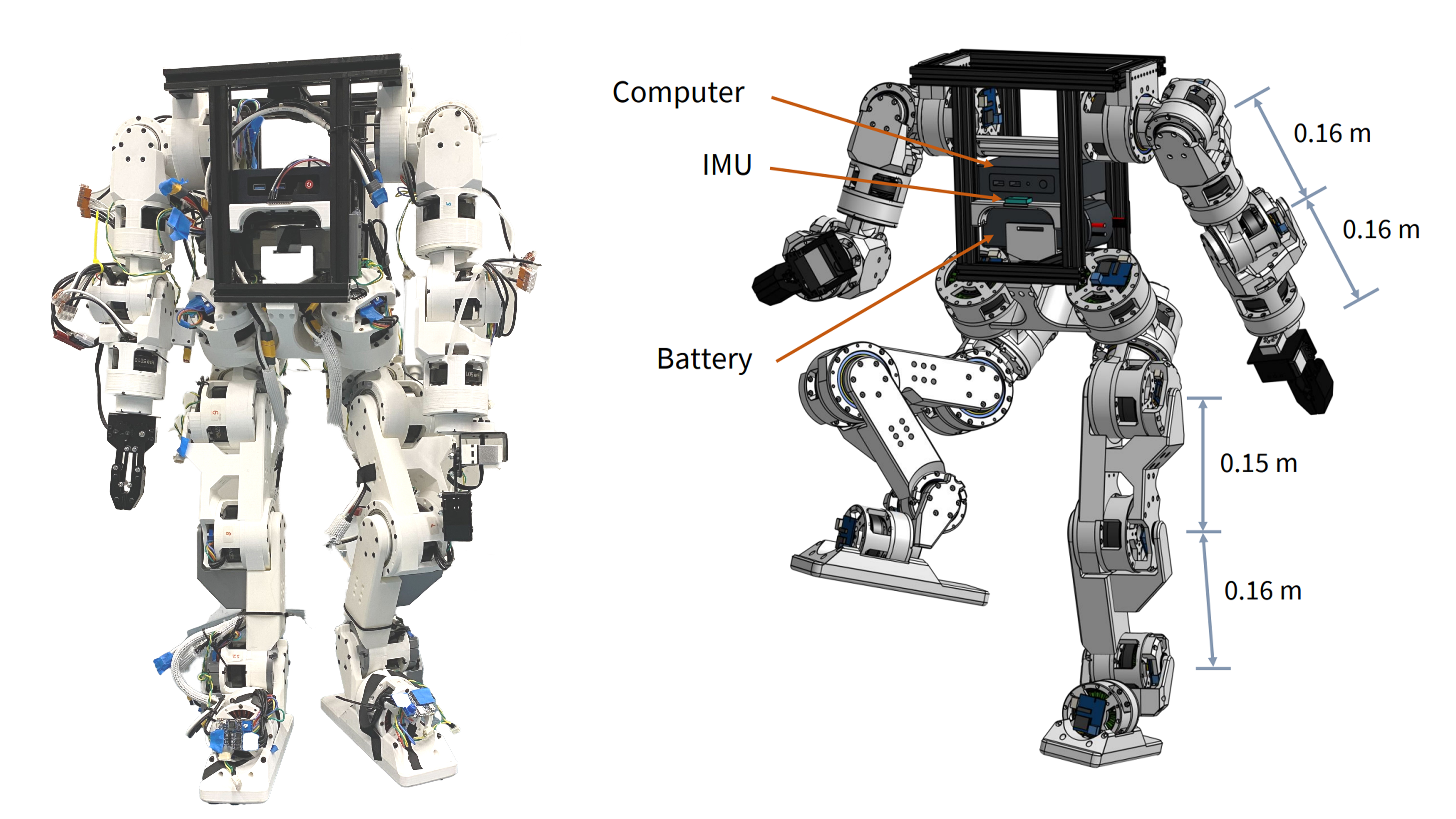
Berkeley Humanoid Lite: Affordable Open-Source Robot with DIY Actuators
Explore the Berkeley Humanoid Lite, a budget-friendly open-source robot featuring 3D-printed actuators under $5,000 USD. Learn how its modular design benefits DIY projects.

Woodstove Safety Monitor: Oru System Alerts Users to Temperature Fluctuations
Discover how the Oru woodstove assistant helps prevent dangerous chimney fires by monitoring exhaust gas temperatures and alerting users to temperature changes.

NES CD Add-On Revives 1980s Gaming with Optical Storage
Explore how a DIY project integrates a CD drive with the NES using an RP2350B microcontroller and Everdrive N8 Pro for expanded storage and audio playback.

Mumbai’s Vile Parle Cypher is giving unheard rappers a voice

Enrich and Ultimo impress

Karnataka CM Signals Review of 5% Park Land Amendment Bill in Assembly

